
In Sextas Ímpares #151, I showed this separation in the context of managing my own ad campaigns. I used an AI assistant to help me build the tool, but the routine that runs every day doesn't call any language model to decide what to do.
Building with AI is different from running with AI
Using AI to write code, design a system's architecture, or connect to external services is one thing. Letting that same AI decide in production, hour by hour, whether a value should go up or down is quite another, and it's rarely necessary when the decision depends only on numeric thresholds.
I explained how the routine runs without consulting a language model. A cron job wakes up every hour, fetches the metrics from the ad platform, compares them against the limits I defined beforehand, and applies the corresponding action. There's no artificial brain thinking about what to do there, and that's on purpose.
If you use a language model to evaluate whether one number is bigger or smaller than another, you're introducing delay, token costs running nonstop, and the risk of the response coming back badly formatted or made up. A simple condition in code solves that comparison in milliseconds and at no extra cost. The flexibility of models is worth more during the building phase or when you genuinely need to interpret language, as I describe in the article on planning an application with Claude Code.
To prepare your next step, explore Business process automation.
The practical example of the AdSummit campaigns
An advertising budget automation works best when it relies on well-defined numeric limits rather than vague interpretations. This helps the system cut or scale investment without hesitation, but the values themselves always come from human decisions made based on the business's history.
In the live session, I showed the hourly routine that monitors the ads for the seventh edition of AdSummit. The system reads the return on investment, cross-references it with the accumulated spend of each ad set, and adjusts the daily budget according to intervals I defined myself based on the six previous editions of the event. The idea was simple: sell tickets without me having to spend the whole day inside the ad manager.
The criteria followed in that specific project were these:
- Cut criterion: an ad set with ROI below 0.8 gets paused, but only after accumulating at least €60 in spend, to avoid rash decisions with too little information.
- Exploration floor: no ad set with total spend under €50 can have its daily budget reduced below €5, giving the ad time to mature before being discarded.
- Gradual adjustment: ad sets with proven return move up a budget tier, while middling ones move down to values like €15 or €10 per day.
- Direct alert: every hourly cycle, I get a WhatsApp message with the day's spend, current return, and the changes made.
These numbers belong to that particular project and shouldn't be taken as a fixed reference for another account or another business. Every operation has its own margin and its own history, and that's where the work of whoever manages the campaign comes in, not the machine's.
Where deterministic logic ends and AI begins
Deterministic logic always gives the same result for the same input, which makes it predictable and easy to audit. AI comes into play when the information isn't tabular, when there's language to interpret, or when the volume of variation is too large for a fixed set of rules.
Imagine a customer support system. If knowing the contracted plan is enough to route the request, start with a rule and test the possible plans, including missing values. If you need to interpret a message, try a language model and compare its classification with the team's reading.
Having a model decide simple numeric rules means paying for complexity you don't need. You run the risk of the model misreading a number in an unexpected format or making up a justification in text instead of simply changing a variable. For those who want to structure broader business processes without depending solely on chatbot conversations, it's worth looking at the approaches I describe in using AI in business beyond chatbot conversations.
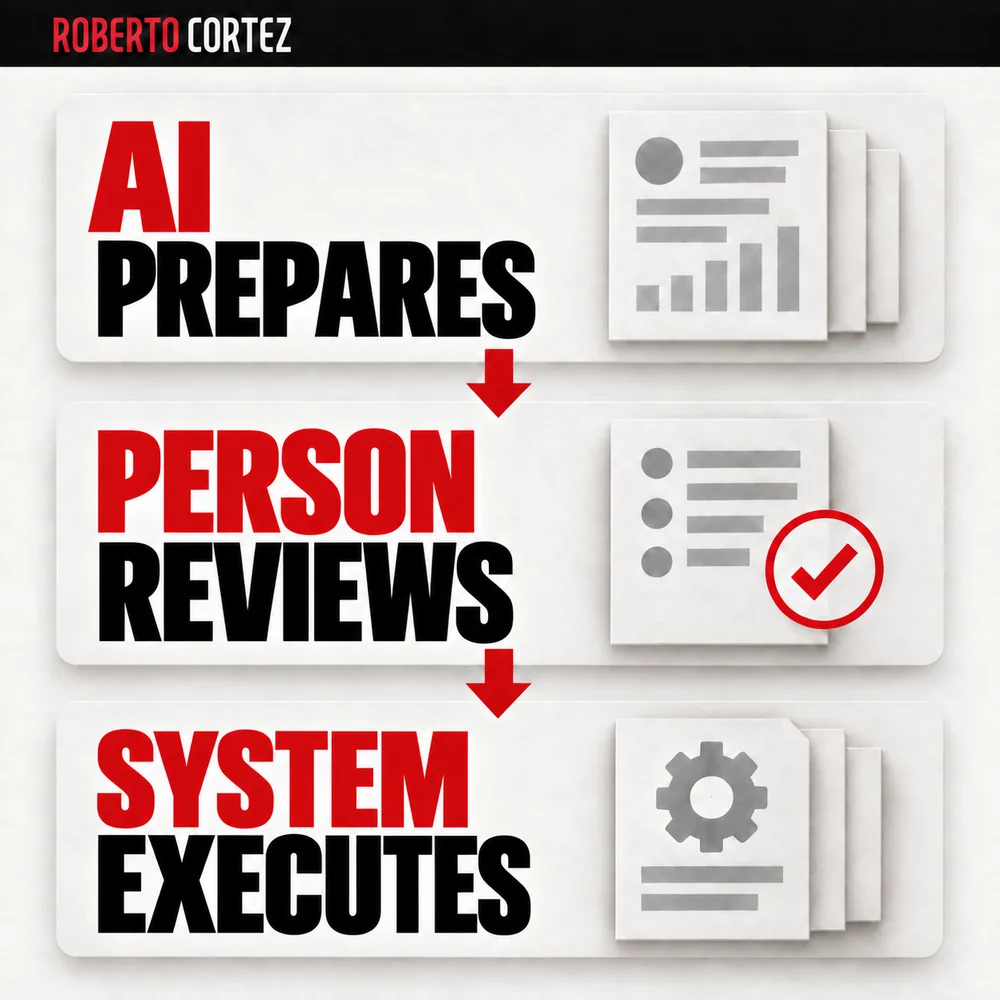
Responsibility still belongs to the human
Automation removes the mechanical work of constantly checking dashboards, but you're still the one who sets the spending limits and cut criteria, and that doesn't change. If you let a system make decisions about money without supervision or periodic review, the risk of losing capital quickly is real.
I insisted that a traffic manager can't shirk responsibility by blaming the tool when results don't show up. If a budget cut hurt a campaign, or if excessive spending went unchecked, the failure was in the limits someone configured, not in the automation itself. The machine follows orders; understanding the economics of the business is still the job of whoever runs it.
It's worth thinking through a hypothetical example to illustrate this: imagine you sell an entry-level course at a symbolic price, with weak or even negative immediate return in the first weeks of the campaign. If you only look at short-term return, you'd pause those campaigns. But if those buyers keep purchasing more expensive products over the following years, the calculation changes completely. An automatic system that only looked at immediate ROI would have cut the investment before that value ever showed up, which is why it's important to set budget tolerance according to the real acquisition strategy, not an isolated number.
Handling exceptions and missing data
An automation becomes vulnerable the moment its data source is delayed, fails, or returns wrong values. Treating that absence of information as if it were a real result of zero conversions can lead to destructive actions before anyone notices the problem.
If the conversion pixel or the platform's API suffers a momentary failure, the reported return artificially drops to zero. A system with no verification would interpret that as poor performance and shut down campaigns that were, in reality, working well. So before giving a system like this full autonomy, it's worth setting up a few safeguards:
- Minimum evaluation window: only evaluate ad sets with continuous data over a defined period, so you don't react to passing signal failures.
- Emergency stop: if the data source returns errors or empty responses, the system should stop without changing budgets, rather than assuming the worst-case scenario.
- Decision logging: save the date, the metric used, and the reason for each change, so you can investigate later what happened.
- Warning phase before full autonomy: in the first few weeks, it's safer for the system to send recommendations rather than act on its own, until you build confidence in the criteria you've defined.
Building flows that the team can follow without creating friction is a concern that applies to several areas of a business, not just ads, as I describe in the guide on how to set up a lead funnel that the sales team can actually work with.
How to decide between rules and AI in your own project
The right choice depends on the predictability of the input data, the speed you need in the response, and the financial consequence of a processing error. There's no universal answer, but there are simple questions that help you decide before putting a language model into an architecture that maybe doesn't need one.
Before introducing calls to AI models into an automated flow, it's worth asking:
- Is the input data predictable and structured? If so, a conditional rule in code is usually enough.
- Is there a real need to interpret natural language or ambiguous intent? If so, isolate that step in a model call and return the result in structured format, without mixing it into the execution logic.
- Does the rule deal directly with money or budget limits? If so, the final execution step should be deterministic, with no room for interpretation.
- Is there a way to manually turn off the automation if something goes wrong? An accessible emergency switch prevents a network or integration error from dragging on unchecked.
- Can you review the history of decisions made by the system? Without that log, it becomes hard to understand what triggered each change when something doesn't add up.
This division helps you choose where to spend resources: rules for well-defined decisions and AI for interpretation tasks. Then you measure cost, errors, and review work. In my AI and automation training, we can discuss these decisions based on the process you're building.
Hypothetical example of request triage: what stays in the rules and what is interpretation
Imagine a support team receiving requests by email that needs to decide what goes to fixed rules and what needs human or AI reading. This example is hypothetical, but it serves to show how to separate the two parts of the work before automating anything.
The first step is to look at the type of request, not the channel it arrives through. An overdue invoice request has a predictable structure: customer number, amount, due date. A complaint about a service has free text, tone, and sometimes ambiguity about what the person actually wants resolved.
For the first case, the rule is simple to write. If the due date has passed by more than seven days and the amount hasn't been paid, send an automatic notice and mark the record as pending. There's no interpretation here, just checking conditions and executing a predetermined action.
For the second case, the task requires reading the text, figuring out if it's urgent, whether it's a refund request, a complaint about service, or just a poorly worded question. Here an AI model can help classify the request and suggest an initial response. But the final decision about whether to refund or not still needs someone to validate it, especially if there's financial impact.
A common mistake is trying to fit everything into the same flow, as if you had to choose between "rules" or "AI" for the entire process. In practice, the same process can have both in sequence. The rule filters what's obvious and resolves it on its own, and only what's left over moves to an interpretation stage, whether done by AI or by a person.
In the support team's hypothetical example, this could work like this: first, a condition checks whether the request has keywords associated with urgency, like "cancel" or "immediate refund." If it does, it goes straight to human review, without passing through any AI, because the risk of error is higher. If it doesn't, it goes to a model that tries to summarize the request and suggest a category. Only afterward does someone decide whether to accept the suggestion or correct it.
This kind of sequence has a practical advantage: you can measure where the effort is going. If most requests fall into the rules part and only a small fraction needs interpretation, you know the investment in fine-tuning the AI model should be proportional to that fraction. It makes no sense to complicate the whole system with AI if ninety percent of cases get resolved with a simple condition.
You also need to decide what to do when the AI doesn't have enough confidence in its classification. One option is to set a threshold: if confidence is low, the request automatically falls into the human review queue instead of proceeding on its own. This prevents interpretation errors from slipping through unnoticed, especially in the first months after putting the system into operation.
Finally, it's worth recording, even just for internal purposes, how many times the AI's suggestion was accepted without changes and how many times it was corrected. That number gives you an idea of where automatic interpretation is working well and where it still needs adjustment, without relying on loose impressions about "it's working well" or "it's failing a lot."
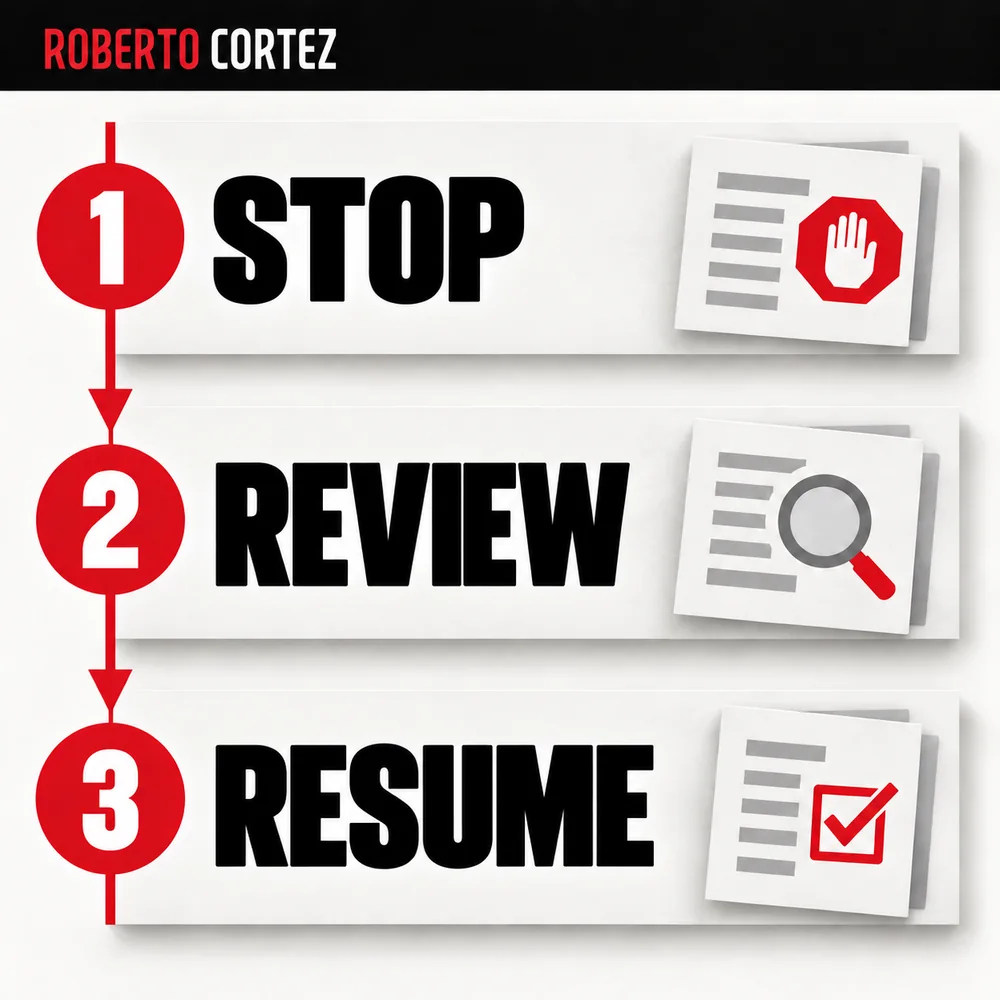
How to handle an exception, request human review and resume without duplicating actions
A well-designed exception identifies the case that falls outside the normal script, stops the automatic action at that point, asks for human confirmation before continuing, and records what has already been done so nothing repeats when the process resumes. Without these four elements, automation risks duplicating sends, payments, or changes.
The first step is deciding what counts as an exception. It's not just a technical error, like a connection failing. It's also a condition the rule didn't anticipate, like a value outside the expected range, or a record that shows up twice within the same time window. If you don't list these cases before building the automation, you'll discover them in production, often too late.
Picture a hypothetical example: a routine that adjusts a campaign's daily budget based on cost per result. The normal rule says to cut the budget by ten percent when cost rises above a set threshold. But what if the source data doesn't update for six hours? Without a foreseen exception, the routine might keep applying cuts based on stale numbers, which distorts the decision.
The simplest way to handle this is to separate detection from action. The automation first checks whether the data is recent and complete. Only if that check passes does it move on to the business rule. If it fails, it enters a waiting state, doesn't execute anything, and flags the situation to whoever is monitoring the process, for example through a WhatsApp message or a simple alert.
Asking for human review doesn't mean stopping the whole system until someone responds. It means isolating just the affected case. If you have ten campaigns running and one of them hits an exception, the other nine keep working normally under the original rule. This requires designing each unit to be handled independently, rather than having a single routine that processes everything in a block and fails completely if one item goes wrong.
After someone reviews and decides, the system needs to know how to resume without repeating what it had already done before the pause. This is only possible if you keep a record of state, for example which was the last action applied and at what time. In the hypothetical campaign example, that means knowing whether the budget had already been cut before the data failure or whether it was still at the original value. Without that record, you risk applying the cut twice, or, on the other hand, never applying it at all.
A practical criterion for deciding whether a situation deserves an exception is to ask what the cost of getting it wrong is. If a misread only produces an inaccurate report, it might not be worth stopping the automation over it. If an error could duplicate a payment or shut down an entire campaign for no reason, then it's worth investing the time to design the pause and the manual review.
It's also worth setting a limit on retries before escalating to human review. If a check fails once, it might just be a momentary hiccup in the data source. If it fails three or four times in a row, that's already a sign that something has changed and needs human eyes, not more automatic attempts.
When an exception occurs, you need to know where the process stopped, what has already been done, and who will decide the next step. This record keeps the team from having to reconstruct the history from scattered messages. You can work through these decisions in my AI and automation training.
How to assess cost and quality before automating a business decision
Before automating any business decision, weigh two factors together: cost per execution and the error margin you can tolerate. A simple rule runs almost free, while calling an AI model costs money per execution and won't always be correct. Balancing both prevents automating something that becomes expensive or unreliable.
Start by listing the decisions you want to automate and split them into two groups. In the first group put the ones with an objective criterion, like a value that crosses a threshold or a date that expires. In the second group put the ones that require interpretation, like judging whether a customer message is a serious complaint or just a request for information. This split alone saves you time, because the first group rarely needs AI.
For the rules group, execution cost is practically irrelevant. What matters is the quality of the data feeding the condition. Imagine, hypothetically, that you want to be alerted whenever a campaign's cost per result rises more than 30% in a day. If the data source fails or duplicates values, the rule will fire false alerts, even though it's simple to write.
For the group that requires interpretation, the calculation is different. Each call to a model has a cost, and that cost multiplies by the volume of cases you process per day or per month. If you're running an operation with a few dozen messages a day, the cost might be negligible. If you're handling thousands, the total cost can become significant and needs to be weighed against the time it would save a person.
The quality of the model's response isn't constant either. It's worth testing the same task several times, with similar examples, and seeing whether the answer changes significantly. If the variation is small and acceptable for your case, the automation can move forward with occasional supervision. If the variation is large, you need to review the process before giving the system more autonomy.
A practical, hypothetical criterion for deciding: if the error from an automation costs more than the time it saves, it's not yet ready to run without supervision. For example, if a poorly calibrated rule generates ten false alerts a week and each one takes ten minutes to check manually, the maintenance cost can wipe out the gain. In that case, it's better to fine-tune the criterion than to expand the automation's reach.
It's also worth deciding, before switching on any automation, what you'll accept as a good enough result. It doesn't need to be perfect, but it needs to be predictable. If you can describe the situations in which the automation might fail and what you'll do when that happens, you already have a solid base to move forward with more confidence.
Finally, review cost and quality periodically, not just at the moment you switch the automation on. Source data changes, case volume changes, and an AI model's behavior can also change over time. Keeping that review as a habit is what separates a useful automation from one that quietly becomes a problem.
How to test a rule change with known cases and log the results
Before letting a new rule run on its own, test it against cases you already know, whose expected outcome you already know in advance. This lets you compare what the rule decides against what you would decide, and catch differences before they cost money or time to fix later.
The first step is to gather a representative set of cases, not just the easy ones. If the rule is about stopping a campaign when cost per result rises above a certain value, include examples of campaigns you'd stop, campaigns you'd keep despite a temporary spike, and edge cases where even you aren't fully sure. These edge cases teach you the most, because they show where the rule's boundary needs adjusting.
Imagine, hypothetically, that you're testing a rule that alerts when cost per lead rises 30% above the seven-day average. You take ten past situations from that campaign, apply the rule to each manually, and write down what the rule would say versus what you actually decided at the time. If the rule agrees with you in eight cases but disagrees in two, those two cases deserve attention before you move forward.
One of those two cases might reveal that the rule triggers because of a single day with low data volume, where one expensive conversion distorts the average. This suggests you need to add a minimum volume condition before the rule fires, for example requiring a minimum number of clicks or impressions in the period analyzed. The other case might show the opposite, that the rule reacts too slowly when the cost increase is fast and consistent, and that the seven-day window should be shorter in that specific scenario.
After adjusting the rule based on these cases, repeat the test with the same set and also with new cases you hadn't used before. This stops you from tweaking the rule just to fit the examples you've already seen, which would make it too specific and less useful for future situations. A good rule generalizes reasonably well to cases that weren't part of the original test.
Always log the results of these tests somewhere you can return to, even if it's just a simple spreadsheet with date, case tested, the rule's decision, the decision you would have made, and a note on what you learned. This log serves two purposes: it helps you justify why you trust the rule when someone asks, and it gives you a baseline for comparison the next time you make a change, so you can see whether you're actually improving or just shifting behavior without real gain.
Also set a clear criterion for knowing when the rule is ready to run without constant supervision. This could be a minimum agreement rate with your own decisions across the tested cases, or a period where the rule ran only in alert mode, without acting, and the alerts matched what you actually did in practice. Only once that criterion is met is it worth giving the rule autonomy to act on its own, and even then with a clear limit on what it can and can't change without confirmation.
Finally, don't treat this test as a one-off exercise done once and forgotten. Business conditions change, costs change, customer behavior changes, and a rule that made sense six months ago might no longer make sense today. Mark a periodic review on your calendar, even a simple one, to repeat the test with recent cases and confirm the rule is still deciding the way you would.