
Why separate who writes from who sends
Giving a language model direct access to fire off emails to clients introduces a risk you don't need to take. If the model misreads a request, the mistake is already out the door by the time anyone notices, and fixing it afterward always costs more than reviewing it beforehand would have.
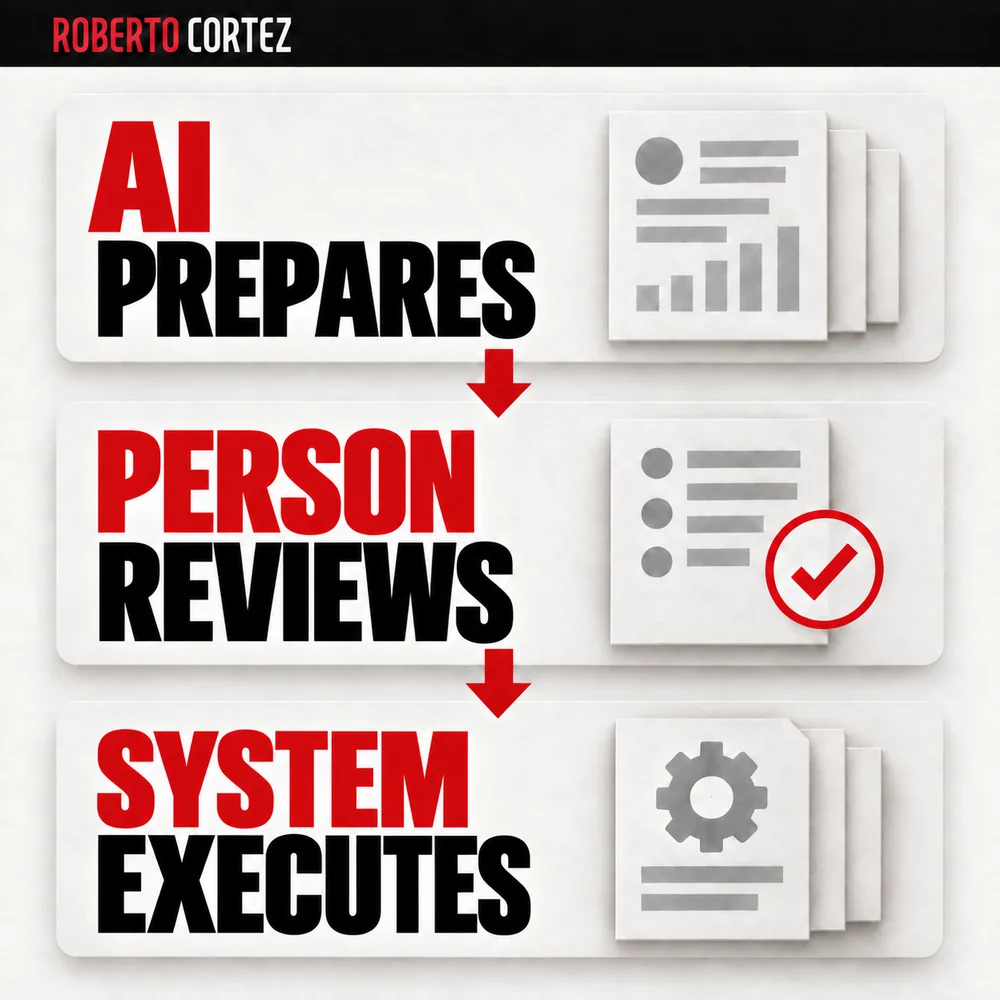
In the class I gave in Sextas Ímpares #128, I described a workflow where AI prepares everything while sending always remains with the human operator. I set up a customized draft directly in your email platform. The person simply reviews the lead, checks the request, edits if necessary, and sends it. The essential requirement is that the final step depends on a conscious decision, regardless of the platform used.
This separation also solves the most common fear teams have about AI: that the machine might slip up behind their backs. If the send button stays in someone's hands, reputational risk is limited to a review mistake, not an unsupervised machine mistake. That also makes it easier to convince a hesitant team to try the process, since nobody is handing over full control to the tool.
Which emails deserve a draft and which should be ignored
Not every message landing in the inbox needs an AI-generated reply. Generating drafts for everything creates more cleanup work than it saves, pulling attention away from messages that genuinely require a decision. In the class I explained that AI should first work out what kind of email it's dealing with before writing anything at all.
The assistant can tell whether an email is promotional or transactional, and it won't draft a reply for every single one. A notification about a completed order doesn't need an AI-generated thank-you draft, because there's no decision to make there.
In the class I explained that AI should first understand the nature of the email before writing anything at all: the assistant has the ability to tell whether that's a promotional email or a transactional email, and it won't be creating a draft reply for every single one. A notification about a completed order doesn't need an AI-generated thank-you draft, because there's no decision to make there.
The practical value lies in reserving drafting effort for emails that genuinely require a thoughtful human answer: support requests, customer questions, sales inquiries. Everything else can simply be skipped by the drafting workflow, which already saves the team reading time and keeps the inbox from filling up with useless suggestions to delete.
How to Turn Support Replies into a Useful AI Knowledge Base
Who approves what when onboarding a marketing client?
How to use AI in business beyond chatbot prompts
To design execution and handle exceptions, explore the business process automation guide.
What information the AI needs before writing the first line
A model without context writes by guessing, and that's exactly what I reject in how I approach this. Without a client's history, without knowing what the company actually offers, and without internal response rules, even a well-written draft risks being wrong on the substance.
In the class I was direct about it: data is gold. If I don't have good data, good context, artificial intelligence becomes dumb, and its decision-making becomes total guessing.
Applied to email, this means the model needs to know what has already been said to the client, what the company actually offers, and how the company usually answers this kind of request. Without that history, even a well-written draft can end up misaligned with what the business really does or promises.
If a client asks about a delivery timeline, the AI shouldn't invent a number. It should pull from the rule that already exists, whether that's a pricing table or past conversation history, and use that as a concrete basis. If that information isn't accessible to the model, the draft will reflect that gap, and that's exactly where human review becomes decisive in catching the failure.
How a draft should surface what the AI is unsure about
A useful draft doesn't hide its own uncertainty. If the model writes with the same confident tone regardless of whether it actually has the right information, reviewers tend to approve out of habit, missing that an unusual question needed more attention.
In the workflow I described in class, the AI's interpretation stays visible to whoever reviews it. The person looks at the AI's interpretation and the message text the AI created before deciding whether it makes sense or needs adjusting.
It's worth thinking about formats that visually separate the suggested reply from any notes of uncertainty, so the reviewer knows exactly where more thought is needed and where the text can be trusted as is. This saves reading time without lowering the quality of the final decision.
Human review and the moment of sending
Review shouldn't be an automatic rubber-stamp. The person's role at this stage is to judge whether the AI's interpretation matches the actual request and whether the suggested reply aligns with what the company would actually do in that specific context.
This is the point where human experience still matters more than any model: prior knowledge of the client, sensitivity to a history of friction, awareness of nuances that aren't written down anywhere. I made this point in class while talking about leads, but the same reasoning applies to email: a person has an eye that artificial intelligence sometimes doesn't have.
The draft saves the work of writing from scratch; it doesn't replace the judgment of whoever actually knows the client. It's that combination that makes the process work well day to day.
Cost per decision as a way to think about the gain
I use a simple formula to justify this kind of automation: cost per decision equals human time times hourly cost, plus infrastructure cost, plus error cost, plus latency cost. It's a way of making visible something that normally stays hidden in the day to day: the real price of each decision a team makes.
In the worked example I used in class, applied to lead management, a task that consumed half an hour per contact dropped to around six minutes of review, cutting the cost per decision from roughly €19.44 to roughly €3.79 per lead. I made clear in class that this is a hypothetical exercise, with error and latency percentages adjustable for each business, not a universal metric.
The value of the exercise lies in the underlying logic: saving minutes per decision across hundreds of monthly contacts produces a significant accumulated difference. You can apply the same reasoning to the time a team spends preparing email replies rather than writing from scratch daily, though actual gains depend on each business's real numbers.
Keeping the process improving over time
A drafting workflow isn't finished after the first setup and then forgotten. If you notice the team constantly fixing the same type of phrasing or the same information gap, that's a sign of missing context in the knowledge base, and it's worth going back to adjust it rather than letting the same corrections repeat indefinitely.
The logic I propose for any automation applies here too: observe what's consuming the most time, decide what to automate, add intelligence where it makes sense, and only then think about scaling. For email, that means periodically reviewing what kind of corrections the reviewer makes most often.
You can use those recurring corrections to adjust the instructions and context feeding the model, closing the loop between what the machine proposes and what the company actually tells clients.
Sextas Ímpares #128: The Era of Intelligent Automation in Business
This article draws on the class I gave in Sextas Ímpares #128, recorded from the Ad Summit studio: https://www.youtube.com/watch?v=XTWg_GjK35Q. Worth checking from 22:50, where I talk about the separate draft-and-send workflow, and from 59:50, where email comes up as one of the repetitive tasks to list in the observation exercise. If you want to see how this reasoning fits into broader AI agent workflows for businesses, I cover more of that in /en/ai-agents-for-businesses/.